
How to run daily deals on Shopify (or weekly and monthly)
To run a daily deal on Shopify, you need the prices to drop and come back every day. In PriceDip, a task with a Weekly schedule and all seven days selected does that, with no discount codes. Shopify’s discounts and bulk editor have no repeat option. The task changes the prices and compare-at prices at each start and begins reverting them at each end. A weekly or monthly deal works the same way. Recurring schedules need a paid plan.
What can Shopify do on its own?
Section titled “What can Shopify do on its own?”- Prices. You can lower prices by hand or with the bulk editor, and put them back by hand, each time the deal runs.
- Launchpad. Shopify Plus stores have Launchpad for scheduled sale events.
- Discounts. A discount code or automatic discount can have a start and end date, but not a repeating one, so you create a new discount for each run. A discount is applied in the cart or at checkout and does not change the price on the product.
For a deal that runs a few times a year, that is manageable. For one that runs every day or every week, the repeated edits are where prices get left wrong.
Which schedule do I need?
Section titled “Which schedule do I need?”There is no separate daily schedule. A daily deal is a weekly schedule with all seven days selected.
| Deal | Schedule in PriceDip | What you set |
|---|---|---|
| Every day | Weekly schedule with every day selected | Every day of the week |
| Every week | Weekly schedule | The days of the week, each with its start and end fields. The end date is optional |
| Every month, such as the first week | Monthly schedule | A start date and an end date, with times, which repeat each calendar month |
How do I set up a weekly deal?
Section titled “How do I set up a weekly deal?”-
Create a Flash Sale task: on the app dashboard, find the Run flash sale card and click Create task.
-
Choose the products and enter the discount. See Quick Start for these steps.
-
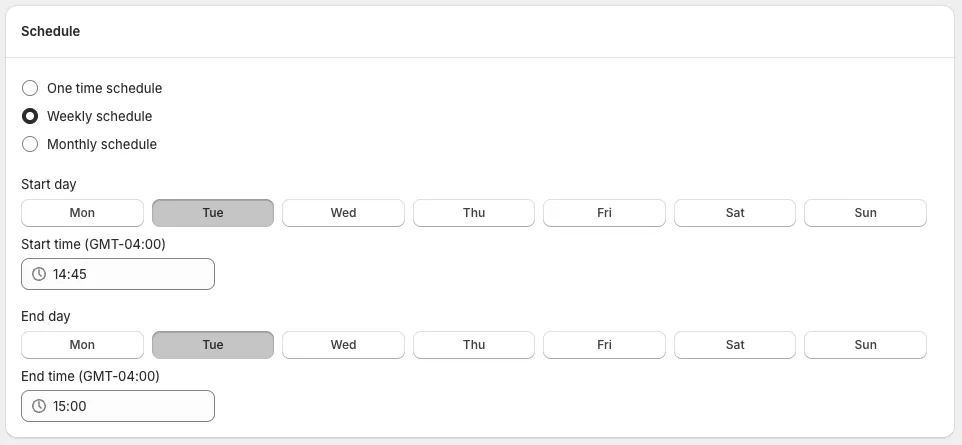
Go to the Schedule tab and select Weekly schedule.
-
Select a day of the week and set its start and end fields. Select more days to repeat on them.
-
Save the task with Status (under Task info) set to Active. Then check a product on your store after the first start and again after the first end.
Each week the prices and compare-at prices change at the start and revert at the end. The schedule’s end date is optional. Times use your store’s time zone.
How do I set up a daily deal?
Section titled “How do I set up a daily deal?”Follow the weekly steps and select all seven days, setting the start and end fields for each.
Our advice: start a new daily deal on five to ten products. Check one on your store after the first start and the first end, so a wrong setting shows up on ten products and not on the whole catalogue.
How do I set up a monthly deal?
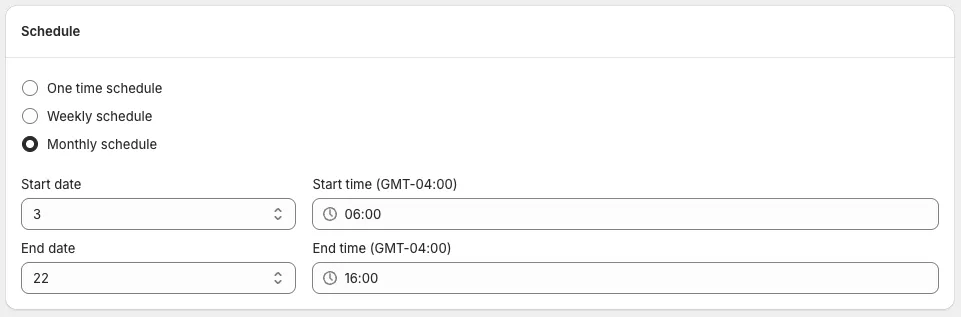
Section titled “How do I set up a monthly deal?”On the Schedule tab, select Monthly schedule, then choose the start date and time and the end date and time. A task set to start on the 3rd at 6:00 am and end on the 22nd at 4:00 pm repeats each calendar month.
What should I check before a deal repeats?
Section titled “What should I check before a deal repeats?”- One task per product. A second Flash Sale task takes its percentage off the price the first one already lowered, and reverting the second returns the product to its original price, which undoes the first too. Keep each product in one active task at a time.
- Processing time. A price change takes about 5 minutes for every 3,000 product variants, and a task cannot be changed or stopped while it is applying. Leave a window long enough for the prices to change well before they revert: a 9,000-variant task needs about 15 minutes, so a deal that starts at 9:00 am and ends at 9:10 am would still be applying when it ends.
- Separate start and end times. When two tasks start together, the order they start in is not guaranteed, and if both change the same products, the price can be changed twice, by an amount you cannot predict. We recommend not starting or ending two tasks at the same time. See Staggering tasks.
- The strikethrough price. Our advice: it should be a price you really charged. A product that is on a deal every day has no real “was” price, and rules about former prices differ by country.
- Customers in the EU or EEA. A sale that repeats within 30 days changes which strikethrough price you may show. See EU 30-day lowest price rule. This is not legal advice.
- Discount codes. A discount code or automatic discount that applies to the product is applied on top of the sale price, so the shopper gets both. See Exclude sale items from Shopify discount codes.
How do I stop a recurring deal?
Section titled “How do I stop a recurring deal?”On the task’s details page, set Status to Inactive and save. That reverts the prices and stops the task running on its schedule. Do not delete an Active task to stop it: deleting leaves the prices as they are.
Is a recurring deal a good idea?
Section titled “Is a recurring deal a good idea?”Our advice: a deal that repeats on a pattern teaches regular shoppers the pattern. A sale every Friday means fewer full-price orders on Thursday. That can still be worth it, for clearing stock or bringing shoppers back on a quiet day. Decide what the deal is for, then compare profit and full-price orders for a few weeks with the deal against a few weeks without. The margin arithmetic is in Do discounts increase profit? A worked Shopify example.
Frequently asked questions
Section titled “Frequently asked questions”How do I run daily deals on Shopify?
Section titled “How do I run daily deals on Shopify?”Shopify’s discounts and bulk editor have no repeat option, so a daily deal needs a daily manual edit or an app. In PriceDip, create a Flash Sale task with a Weekly schedule and select every day of the week. The prices change and revert each day. Weekly schedules need a paid plan.
Can I schedule a sale to repeat every week on Shopify?
Section titled “Can I schedule a sale to repeat every week on Shopify?”A PriceDip task with a Weekly schedule repeats every week, on the days you select. Prices start to revert at each end. Weekly and monthly schedules are on paid plans.
Do prices revert after each run of a recurring deal?
Section titled “Do prices revert after each run of a recurring deal?”Each run of a recurring task starts reverting the prices at its end time, then changes them again at the next start.
Does a recurring sale follow the EU 30-day rule?
Section titled “Does a recurring sale follow the EU 30-day rule?”A sale that repeats within 30 days makes the EU rule harder to meet, because the strikethrough price must be the lowest price charged in at least the previous 30 days, which can be the last deal price. Check the rule before repeating a sale for customers in the EU or EEA. This is not legal advice.