Shopify discount not converting? Find where shoppers drop off
When a Shopify discount does not convert, price was not what stopped the shopper. Find the step where shoppers leave your store (before they arrive, on the product page, in the cart, or at checkout) and fix that step before you make the discount deeper. A lower price helps someone who already wants the product and is ready to pay. It does nothing for someone who never saw the sale, is unsure about the product, or is surprised by the delivery charge.
Where are shoppers dropping off?
Section titled “Where are shoppers dropping off?”Open the conversion funnel in your store analytics for the days the sale ran. At the time of writing, Shopify reports sessions, sessions that added to cart, sessions that reached checkout and sessions that purchased. Compare each step with a normal period of the same length.
| What you see | What it means | Fix first |
|---|---|---|
| Visits did not rise during the sale | Shoppers never heard about it | Announce the sale before and during it |
| Product views rose, add-to-cart rate did not | The page does not make the case for the product | Rework the product page, not the price |
| Carts rose, checkouts did not | Nothing tells the shopper to decide now | Publish a real end time |
| Checkouts started, orders did not follow | A cost or delay appeared late | Show delivery cost and time earlier |
| Orders rose, but from your regulars | The offer reached people who buy anyway | Narrow what is on sale and who hears about it |
Shoppers never arrived
Section titled “Shoppers never arrived”A price change that nobody hears about is not a sale. If visits were flat, the discount was never tested.
Our advice:
- Email your list before the sale starts, and send a last-chance reminder before it ends.
- Put the offer in a banner on every page. See How to write a Shopify sale banner that gets clicked.
- Collect the sale products in one collection and link it from the main menu. See How to run a flash sale on Shopify.
They viewed the product and left
Section titled “They viewed the product and left”If the add-to-cart rate on sale products is the same at the sale price as at the full price, the price was not the obstacle. The shopper either did not understand the product or did not feel safe buying it from you.
Signs to look for: support receives the same questions about sizing, materials, returns or delivery from people who have not ordered yet, and the page shows the product on a plain background with a list of specifications.
Our advice:
- Open the description with who the product is for and the problem it solves.
- Answer the questions support keeps getting, on the page itself.
- Show reviews and customer photos beside the price.
- State the returns terms and the delivery time on the product page, in a sentence each.
They added to cart and stalled
Section titled “They added to cart and stalled”A cart that is filled and abandoned usually means “later”. An offer with no visible end is easy to put off, and a discount that has been running for a long time has already told shoppers there is no rush.
The fix is a deadline that is true: a published end time, after which the price goes back up.
In PriceDip, a Flash Sale task has a start time and an end time, and prices revert when the task ends. PriceDip changes the product’s price and compare-at price, so the sale shows on the product. It does not create discount codes.
-
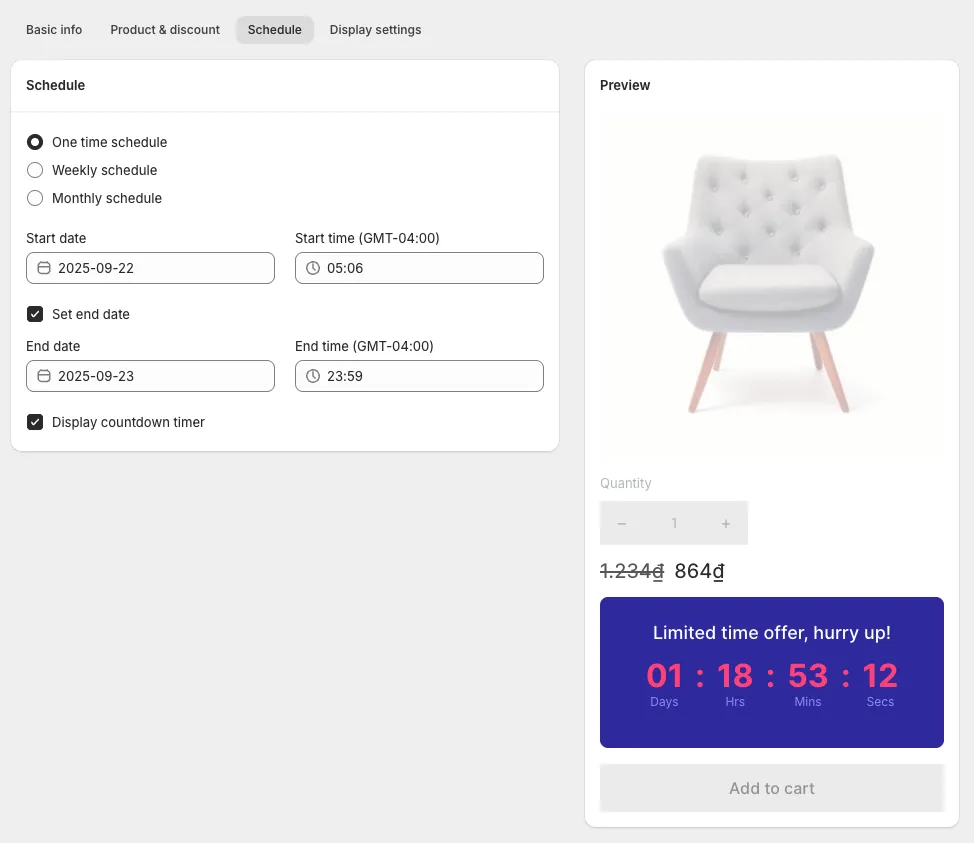
Create a Flash Sale task and set the end date and time on its Schedule tab. See Scheduling and recurring sales.
-
Tick Display countdown timer on the same tab. The countdown timer shows shoppers the time left before the offer expires. It requires a paid plan and is for Flash Sale tasks only. It also needs the app’s embed switched on in your theme: see Enable the app embed.
-
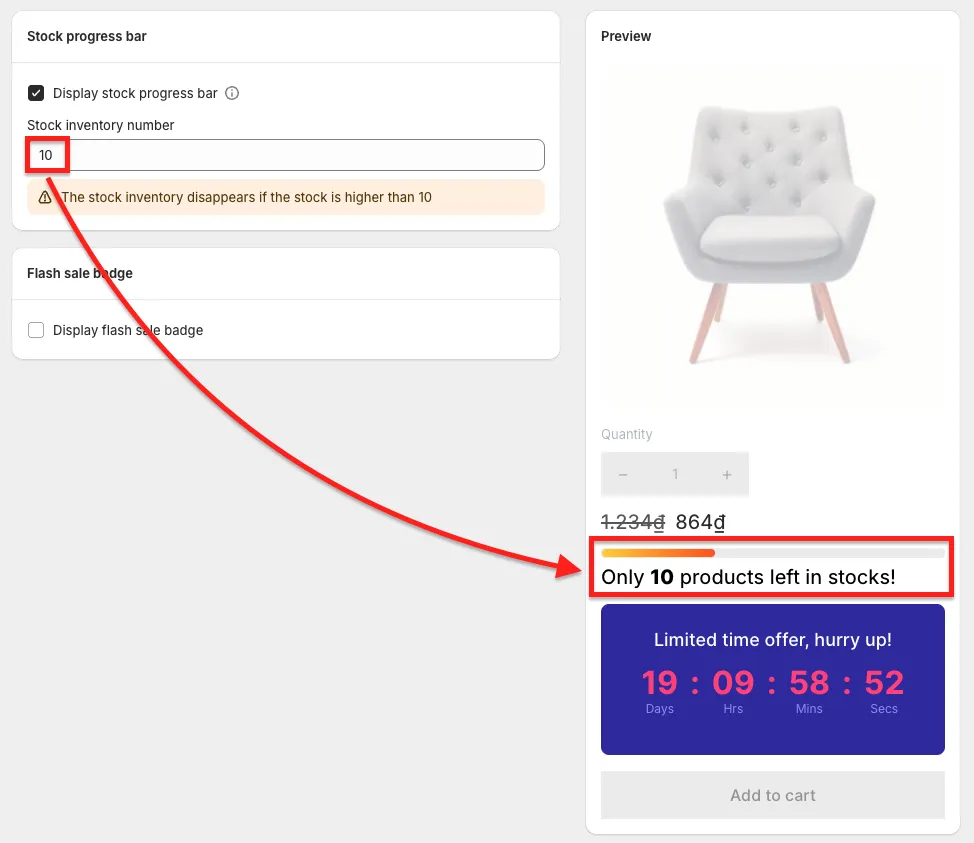
If stock really is limited, tick Display stock progress bar on the Display settings tab. The stock progress bar is available on every plan, including the Free plan. It shows while the product has stock that is no higher than the Stock inventory number you enter.
Our advice: when the timer runs out, let the sale end. Extending it teaches returning shoppers that your deadlines move. The end date on a task is optional, but a sale without one has no deadline to show.
They started checkout and quit
Section titled “They started checkout and quit”If shoppers reach checkout and leave, look at what they learn there for the first time. A delivery charge larger than the savings, or a delivery time longer than expected, undoes the discount.
Our advice:
- State delivery cost and delivery time on the product page and in the cart.
- If you offer free delivery above an order value, say so before checkout. That is a shipping setting in your store, not something PriceDip does.
The discount was used, but only by regulars
Section titled “The discount was used, but only by regulars”If most sale orders came from existing customers buying what they always buy, the sale moved margin, not demand.
Our advice:
- Put the products that need help on sale, not the whole catalogue. A task can target all products or specific products on every plan. Targeting by collection, tag or product type is on paid plans. See Selecting products.
- Promote the sale where new shoppers are, not only to your own list.
- Work out what the discount costs you first. See Do discounts increase profit? A worked Shopify example.
Before you deepen the discount
Section titled “Before you deepen the discount”Run through this list. Every item is cheaper than giving away more margin.
- The sale was announced by email, in a banner and in the menu.
- The product page answers the questions support receives.
- Reviews, returns terms and delivery time are visible beside the price.
- The storefront shows when the sale ends, and the price will go back up at that time.
- Delivery cost is visible before checkout.
- Only the products the sale is meant to move are discounted.
The app used in the steps above is PriceDip on the Shopify App Store.
Frequently asked questions
Section titled “Frequently asked questions”Why is my Shopify discount not converting?
Section titled “Why is my Shopify discount not converting?”A discount does not convert when price was not the reason shoppers held back. Look at where they leave: if visits did not rise, nobody heard about the sale; if shoppers viewed the product and left, the page did not convince them; if they filled a cart and waited, there was no deadline; if they quit at checkout, a delivery cost or delay appeared late.
Should I make the discount bigger if nobody is buying?
Section titled “Should I make the discount bigger if nobody is buying?”A bigger discount is not the first step. A deeper discount costs margin on every order and does not fix a sale nobody heard about, an unconvincing product page or a surprise at checkout. Fix the step where shoppers leave, then run the same discount again.
Does a countdown timer make a discount work better?
Section titled “Does a countdown timer make a discount work better?”A countdown timer helps only when the price really goes back up at the end. It makes the end of the offer visible, which gives a shopper who is ready to buy a reason to do it now.
How long should a Shopify sale run?
Section titled “How long should a Shopify sale run?”Our advice: run a flash sale for about a day, meaning roughly 24 hours. A short window keeps the end close enough to matter, and we would not call anything longer than three days a flash sale. This is our judgement, not a tested result.
A longer seasonal sale needs a deadline just as much. Whatever the length, publish the end date and time and let the prices go back up when it arrives.
See the section on flash sale length in How to run a flash sale on Shopify.